Estimate with AI agents. Run the job in one place.
Six AI agents turn a plan into a priced quote. The same workspace then runs the job: schedule, crew, purchasing, costs and progress claims.
Bill of Quantities Agent
Reads your landscaping plan and produces a complete, itemized bill of quantities — every scope item with precise measurements in m², linear metres, or unit count — ready to price.
- Complete Scope Extraction - Identifies every landscape element on the plan, from planting beds to hardscape zones
- Precise Measurements - Calculates area (m²), linear length, and item counts directly from the plan
- Structured Line Items - Every item is captured with notes so nothing gets missed during pricing
- Estimator-Ready Output - A standardized BOQ ready to hand straight to your estimator
See the workflow, step by step
Before (manual)
- Print plan or open PDF
- Manually measure with ruler/scale
- Calculate areas with calculator
- Double-check all measurements
- Enter into a spreadsheet by hand
After (AI agent)
- Upload plan image/PDF
- AI analyzes in seconds
- Automatic measurements & calculations
- Structured line items with notes
- Export a complete BOQ instantly
Estimate Agent
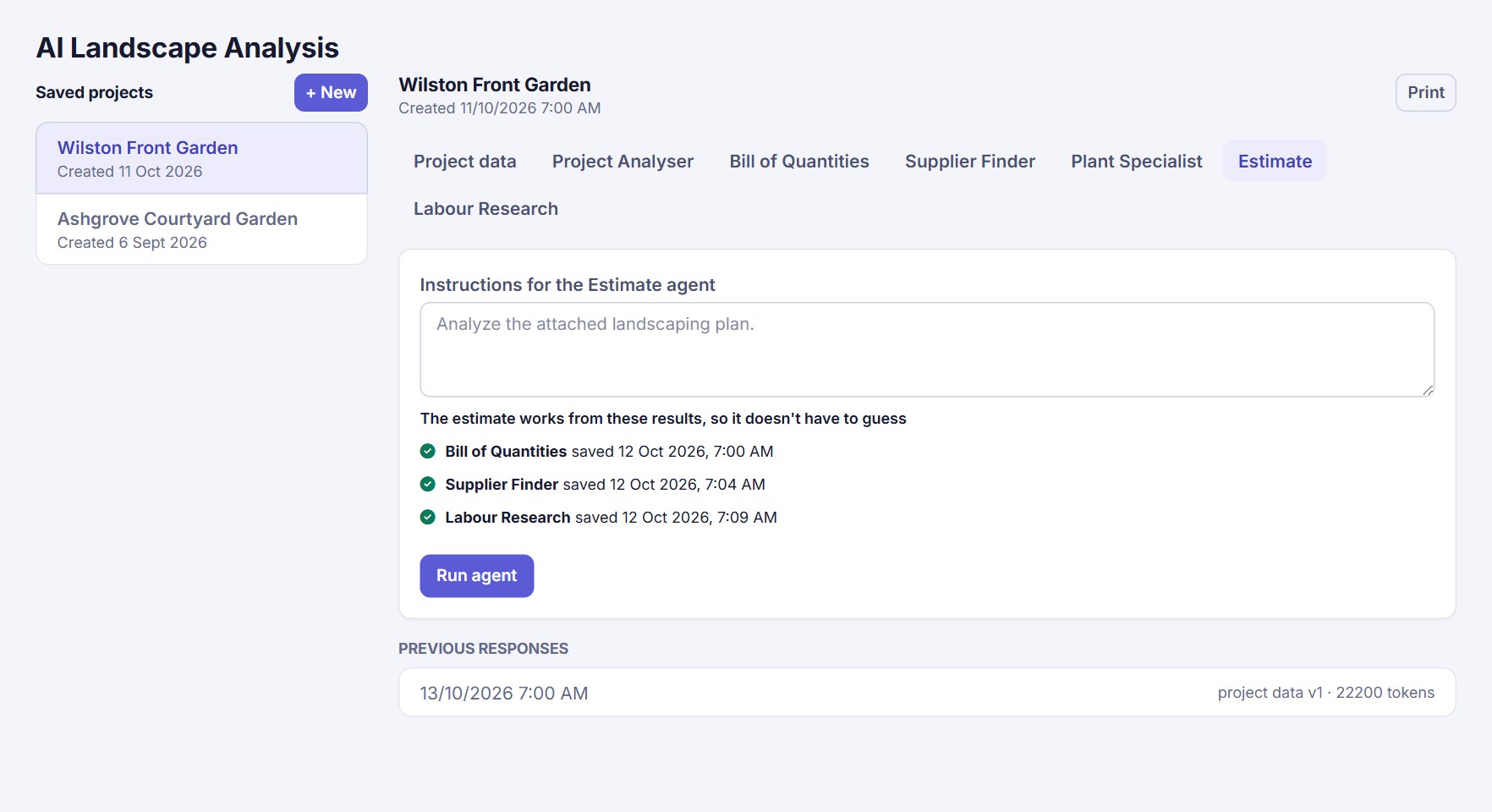
Prices the whole project from the results of three other agents, so it works from real quantities, supplier prices and labour hours instead of guessing. Every scope item is split into materials, subcontracts, expenses and labour, at your cost.
- No Guessing - Only runs once the Bill of Quantities, Supplier Finder and Labour Research results are saved, and is given all three
- Your Cost, Not a Selling Price - Each line is what you pay: markup is kept separate, so it is never counted twice
- Default Markups Applied - Your markups for materials, subcontracts, expenses and labour are added when the quote is created
- Every Scope Item Priced or Explained - Anything the agent couldn't price is flagged, so a gap never slips into a quote
See the workflow, step by step
Before (manual)
- Identify all materials needed
- Contact multiple suppliers for quotes
- Calculate labour hours manually
- Apply profit margin guesswork
- Compile pricing spreadsheet
After (AI agent)
- Run Bill of Quantities, Supplier Finder and Labour Research
- AI prices each scope item from their results
- Materials, subcontracts & labour costed at your cost
- Your default markups turn cost into price
- Complete quote ready to edit and send
Plant Specialist Agent
Reads your plan and produces a full plant schedule — common name, botanical name, growing and maintenance requirements, and a suggested alternative for anything that may be hard to source.
- Full Botanical Detail - Common name, botanical name and growing requirements for every specified plant
- Maintenance Guidance - Care and maintenance notes captured alongside each entry
- Built-In Substitutions - Suggests an alternative for any plant that may be unavailable
- Client-Ready Schedule - Delivered as a clean, structured list ready to attach to your quote
See the workflow, step by step
Before (manual)
- Read plant list off the plan by hand
- Look up botanical names and growing requirements
- Research maintenance needs per species
- Find substitutes for hard-to-source plants
- Compile into a client-ready schedule
After (AI agent)
- Upload plan
- AI extracts every specified plant
- Adds botanical detail & care notes
- Suggests alternatives automatically
- Ready for client presentation
Supplier Finder Agent
Reads your plan and produces a full product list — supplier name, contact details, quantity, unit price and line totals — so you can source everything from one document.
- Complete Product List - Every material and plant on the plan captured as a line item
- Supplier Contact Details - Name, email and phone captured alongside each product where available
- Quantity & Pricing - Quantity, unit price and total calculated per line
- One Document Sourcing - A single, structured list ready to send out for quotes
See the workflow, step by step
Before (manual)
- Search for local suppliers online
- Call or email for individual quotes
- Wait for quote responses
- Manually compare pricing & availability
- Compile into a sourcing list
After (AI agent)
- Upload plan
- AI identifies every product needed
- Supplier & contact details attached
- Quantity, price and totals calculated
- One document ready to send for quotes
Project Analyser Agent
Reads your plan and produces a project overview plus key recommendations, identifying risks, compliance issues, and site considerations before they impact your bottom line.
- Site Characteristics - Assesses accessibility, ground conditions, multi-level aspects, and utilities
- Environmental Factors - Evaluates weather patterns, seasonal impacts, climate considerations, and UV exposure
- Safety & Compliance - Flags multi-storey work hazards, dangerous locations, chemical safety, and confined spaces
- Serviceability & Maintenance - Analyzes maintenance access, equipment servicing, emergency access, and ongoing care
- Abnormalities & Risks - Identifies design conflicts, non-standard materials, and budget constraints
- Permits & Fees - Flags approvals, permits, and fees the project is likely to require
See the workflow, step by step
Before (manual)
- Manually review entire project scope
- Assess individual site characteristics
- Research environmental factors & regulations
- Identify potential safety & compliance issues
- Compile risks & recommendations
After (AI agent)
- Upload project plan to AI
- AI analyzes all project dimensions
- Auto-identifies risks & compliance gaps
- Flags permits, fees & key recommendations
- Download comprehensive analysis report
Labour Research Agent
Reads your plan and produces a full labour cost breakdown — local labour rates by role, hours per scope item, crew sizing, and a week-by-week project timeline.
- Local Labour Rates - Hourly rates for supervisors, skilled and unskilled labourers based on your region
- Task-Level Hours - Hours per unit and total hours calculated for every scope item
- Crew & Duration Metrics - Average crew size, total project duration and peak demand periods
- Week-by-Week Timeline - A full project timeline broken down by week, ready for scheduling
See the workflow, step by step
Before (manual)
- Break plan into individual scope items
- Look up local labour rates per trade
- Estimate hours per item manually
- Work out crew sizes and scheduling
- Build a week-by-week timeline by hand
After (AI agent)
- Upload plan
- AI applies local labour rates by role
- Calculates hours per scope item
- Determines crew sizing & duration
- Generates a full weekly timeline
From accepted quote to final claim
Accept a quote and it becomes a project. Everything after that happens in the same workspace, using the same figures, so nothing is typed in twice.
Quotes that show cost, markup and price
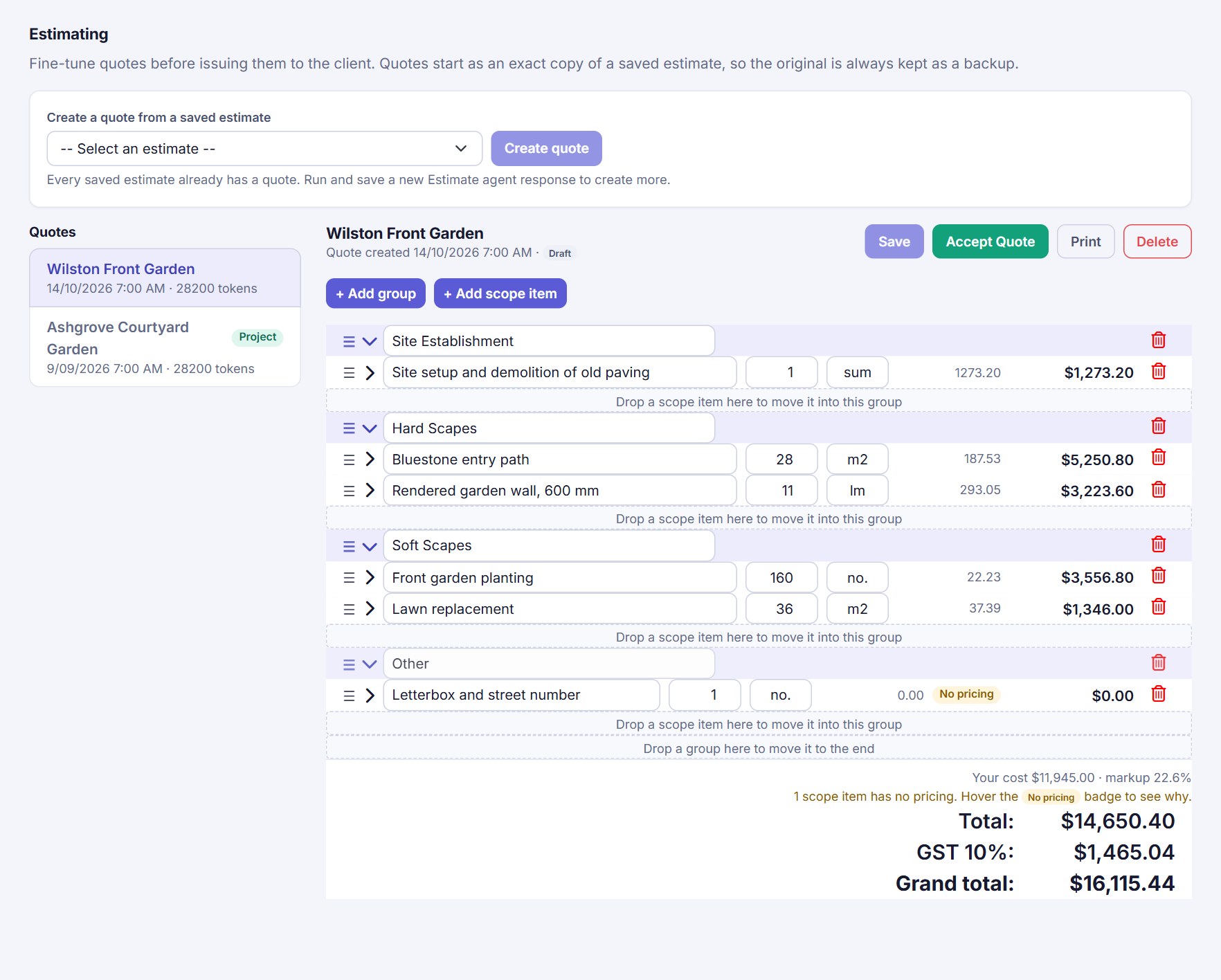
Turn an estimate into a quote you can fine-tune. The AI gives your cost for every line; your markups turn that into the price your customer sees.
- Cost, Markup and Price on Every Line - Open a scope item to see unit cost, markup % and price, and change any of them
- Default Markups and Your Own Labour Rates - Set your markups once, and a rate for each labour role (wage plus on-costs); every new quote starts with them
- Set Markups in Bulk - Change the markup on each kind of costing for one scope item or the whole quote, with a preview of the new price
- Your Margin at a Glance - Your cost and overall markup sit above the total, GST and grand total
- No Pricing Flag - A scope item with no price is badged, with the reason a hover away
- Every Revision Kept - Save each change during negotiation as a new revision; the client can accept any of them, not only the newest
A schedule built from the quote
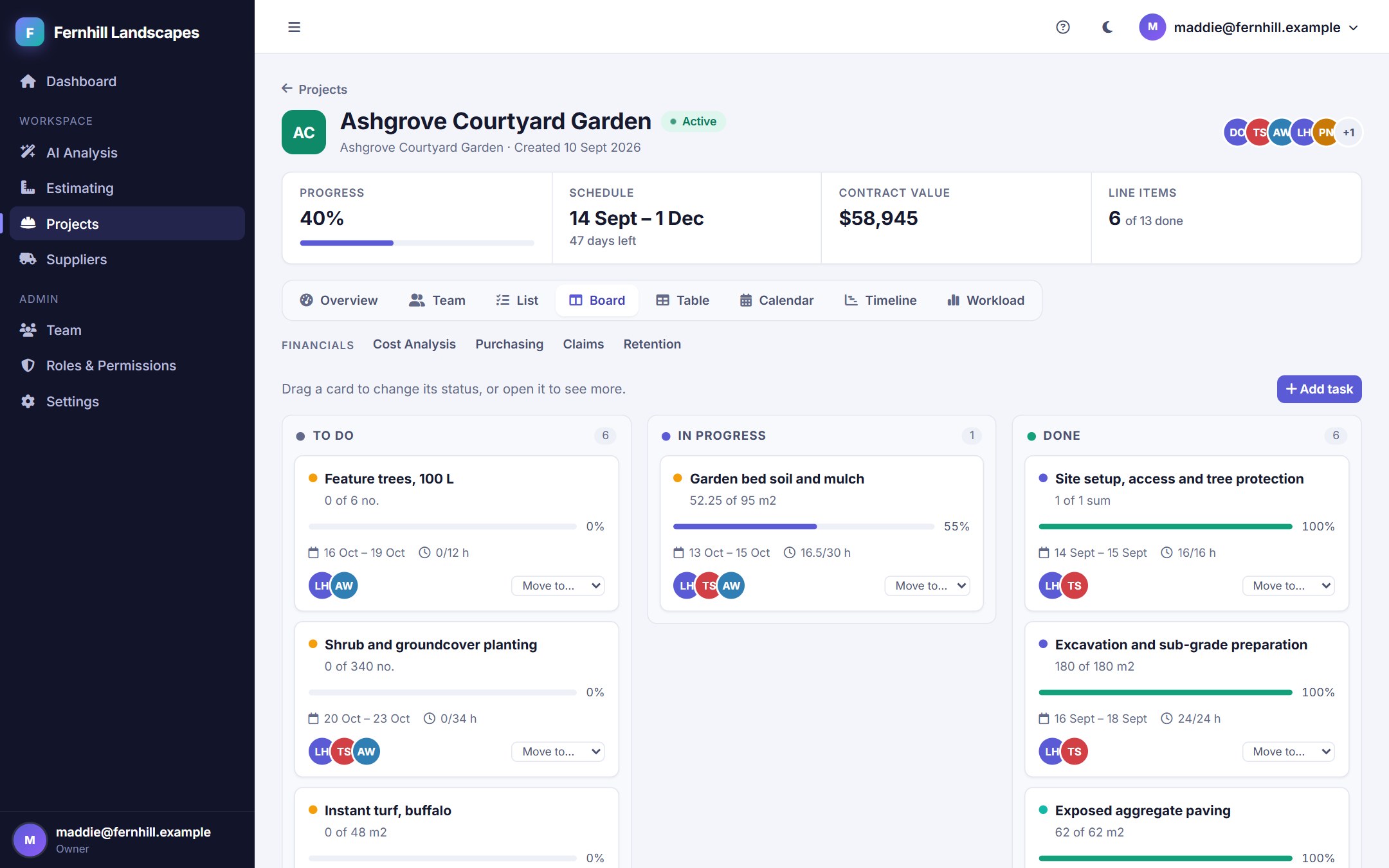
Accept a quote and every scope item becomes a line item with dates, a crew and planned hours. Follow the work in whichever view suits the person looking.
- Dates From Labour Hours - Bar length comes from the labour hours, the crew and an 8-hour day, with Maintenance always last
- Order of Work - Say which line item has to wait for another and the Timeline draws the arrow, and warns if the dates clash
- Progress by Quantity - Record what was done each day; percentages, the board and claims all follow
- Drag to Update - Move a card across the Board to change its status
- Overview
- Team
- List
- Board
- Table
- Calendar
- Timeline
- Workload
Purchasing that updates your costs
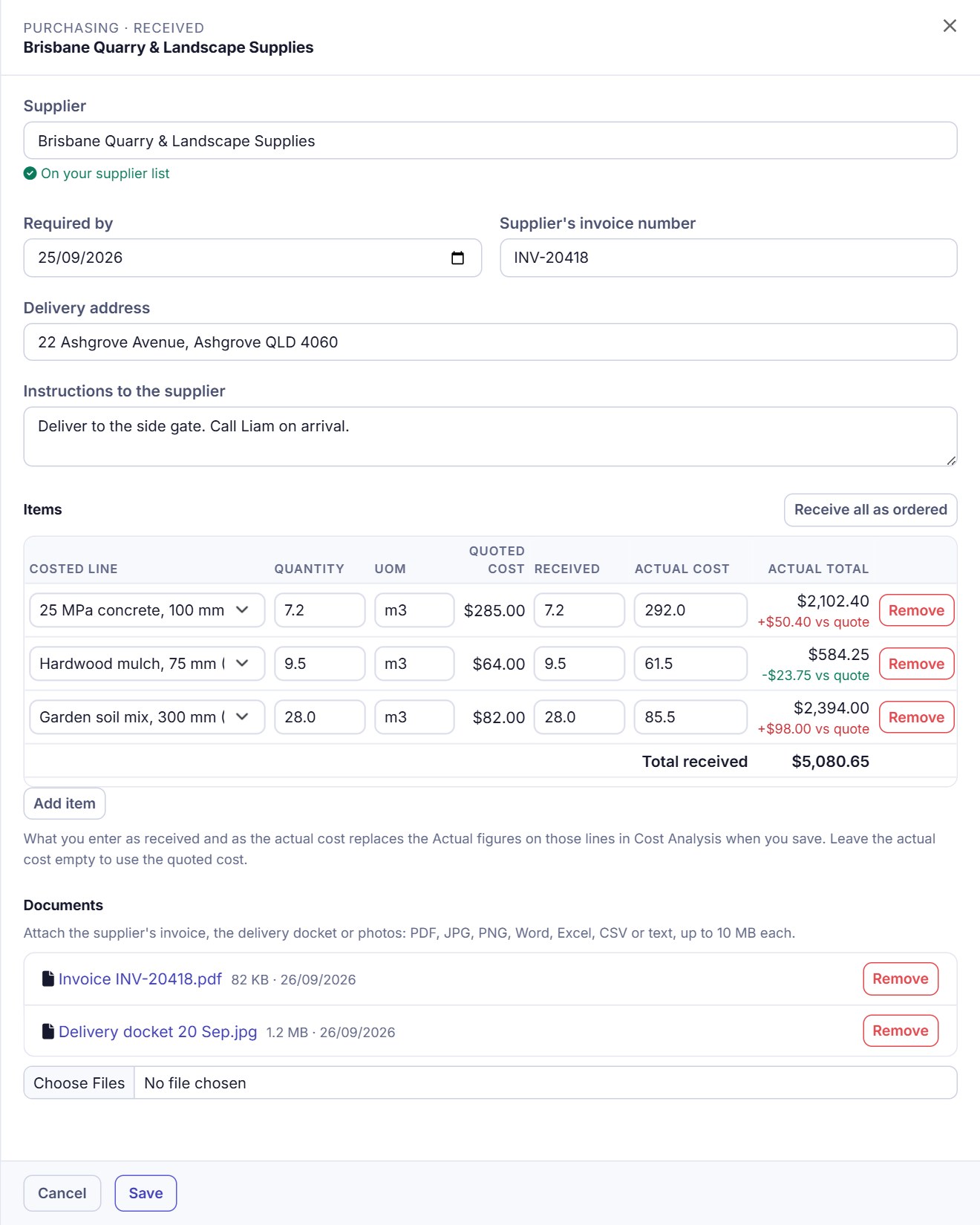
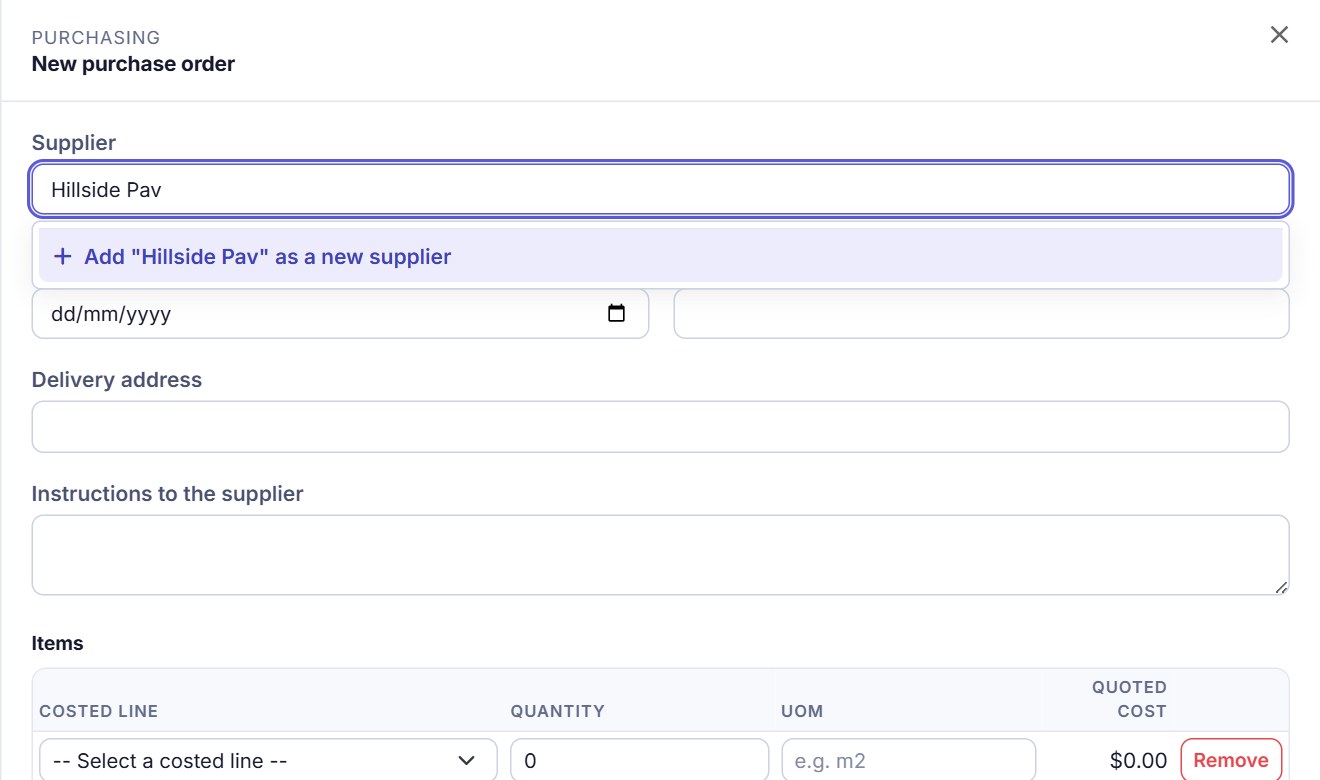
Raise purchase orders against the costed lines of a quote. When the goods arrive, record what you actually paid and Cost Analysis follows.
- Receive at the Real Cost - Enter the quantity received and the actual unit cost; several orders for one line are averaged by quantity
- Unit of Measure - Every item carries its own UOM, starting from the quote's unit
- Invoices and Dockets Attached - Keep the supplier's invoice, delivery docket or photos with the order
- Edit Any Time - Correct an order in any status; the costs recalculate
A supplier list that fills itself in
Keep the companies you buy from in one place. The supplier box on a purchase order fills in as you type, and a new supplier is added without leaving the order.
- Autofill - Start typing and choose from your list
- Add on the Spot - If the name isn't there, add its contact, phone and email right in the order
- No Duplicates - Adding a name you already have simply picks the one you have
- Retire a Supplier - Owners and admins can deactivate one; it stays on old orders but is no longer offered
See your margin while the job runs
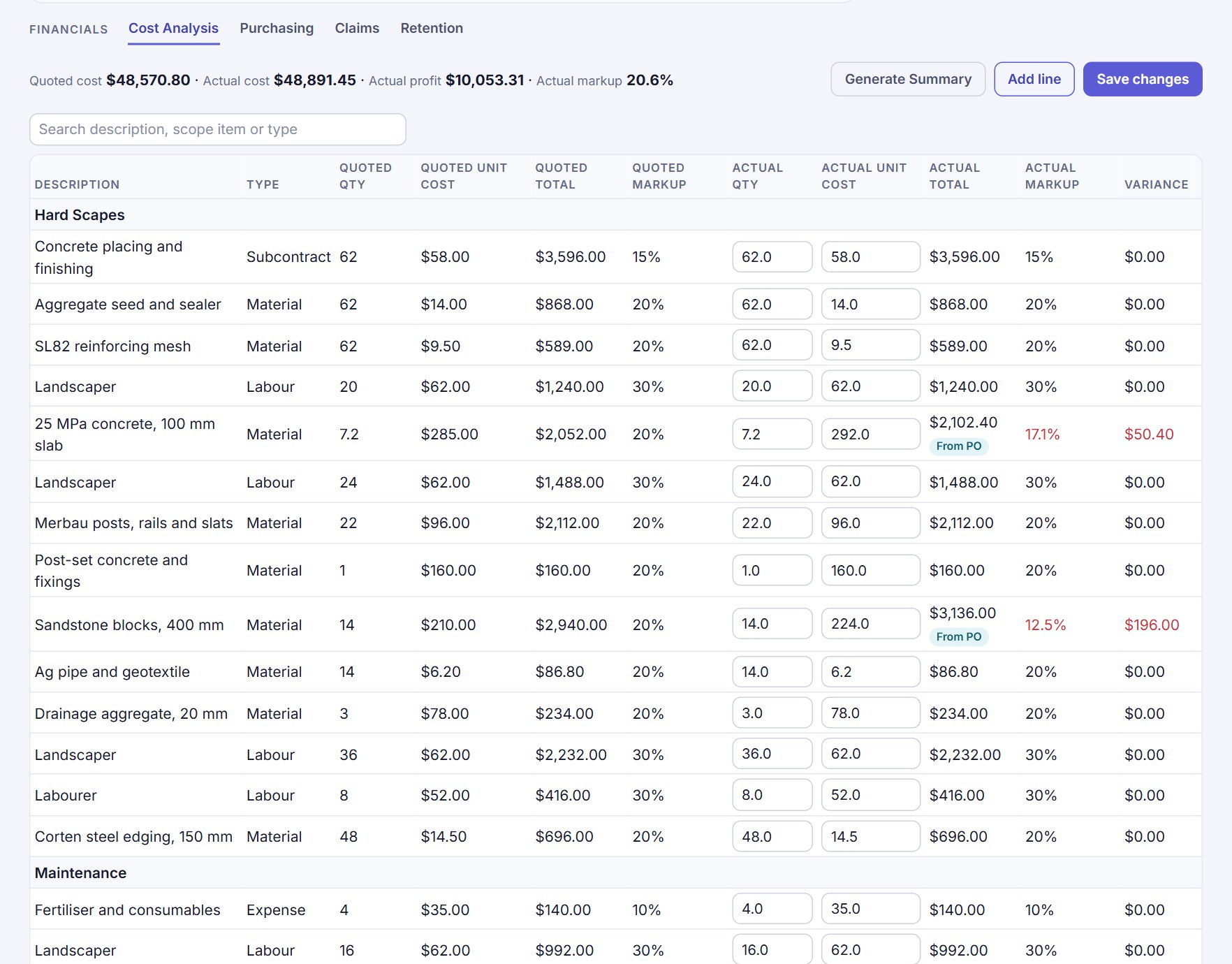
Cost Analysis sets what you quoted against what the job is costing, line by line, with the markup you expected next to the markup you are getting.
- Quoted and Actual Markup - Worked out from cost and price on every line, with the variance in red when it slips
- From PO - Costs taken from received orders are labelled, so you know which figures are real
- Search - Type part of a description, scope item, group or type to see only those lines
- Totals Up Top - Quoted cost, actual cost, profit and overall markup stay in view
Progress claims in a few clicks
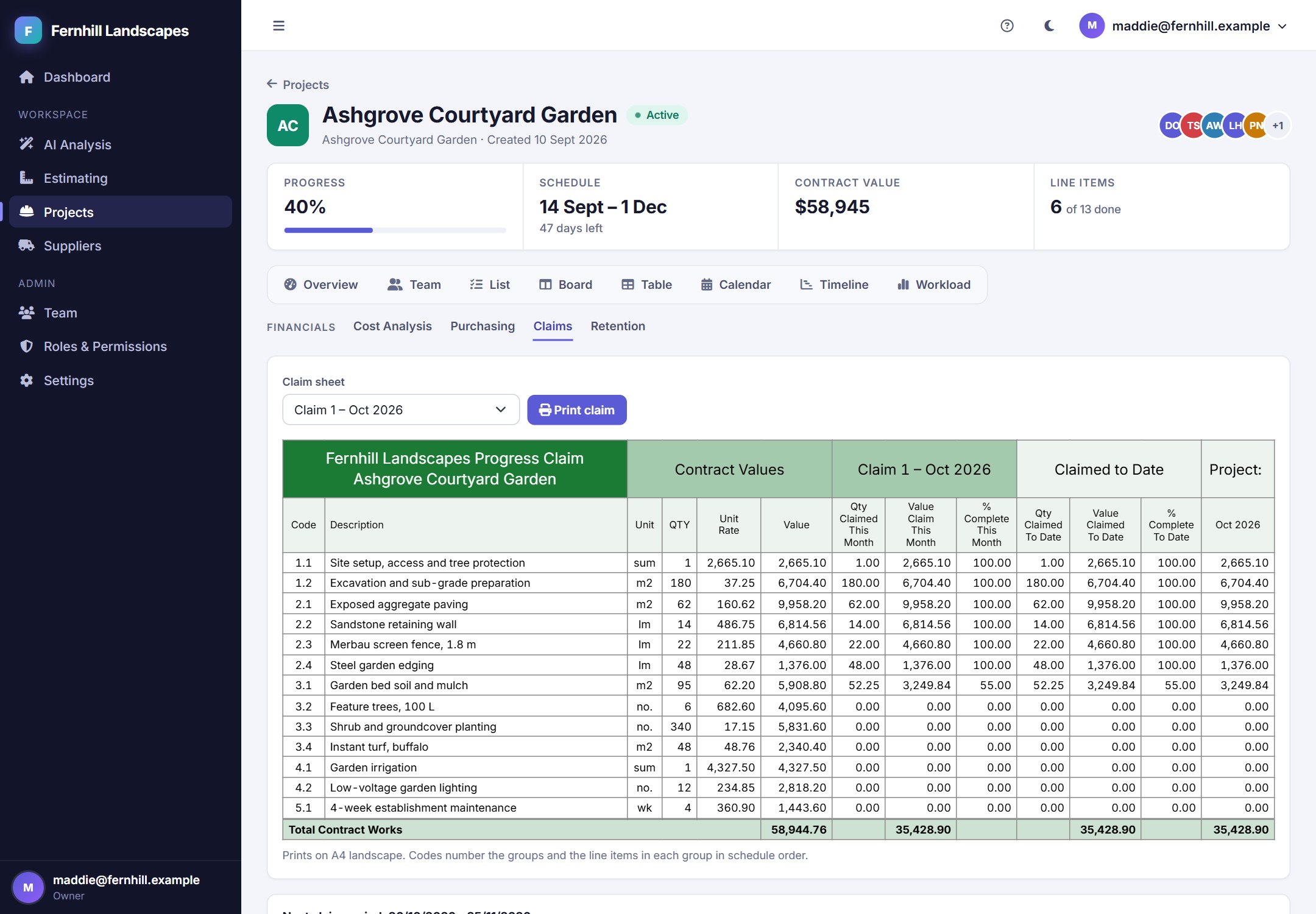
Record the work done and the next claim fills itself in. Print it in your own brand colour, with retention held back and tracked for you.
- Claim Sheet - Contract values, this month's claim and claimed to date for every line item
- Print or Save as PDF - A4 landscape, in your brand colour, with the items numbered in schedule order
- Retention Handled - Withheld from each claim by your rules, with a ledger of what was held and released
- Your Claim Period - Choose the day each period starts and ends once, for every project
- Variations Claimed Separately - Extra work approved after the quote sits below the contract works on the sheet, as Variation 1, Variation 2, and is totalled on its own
Your whole crew, kept safe
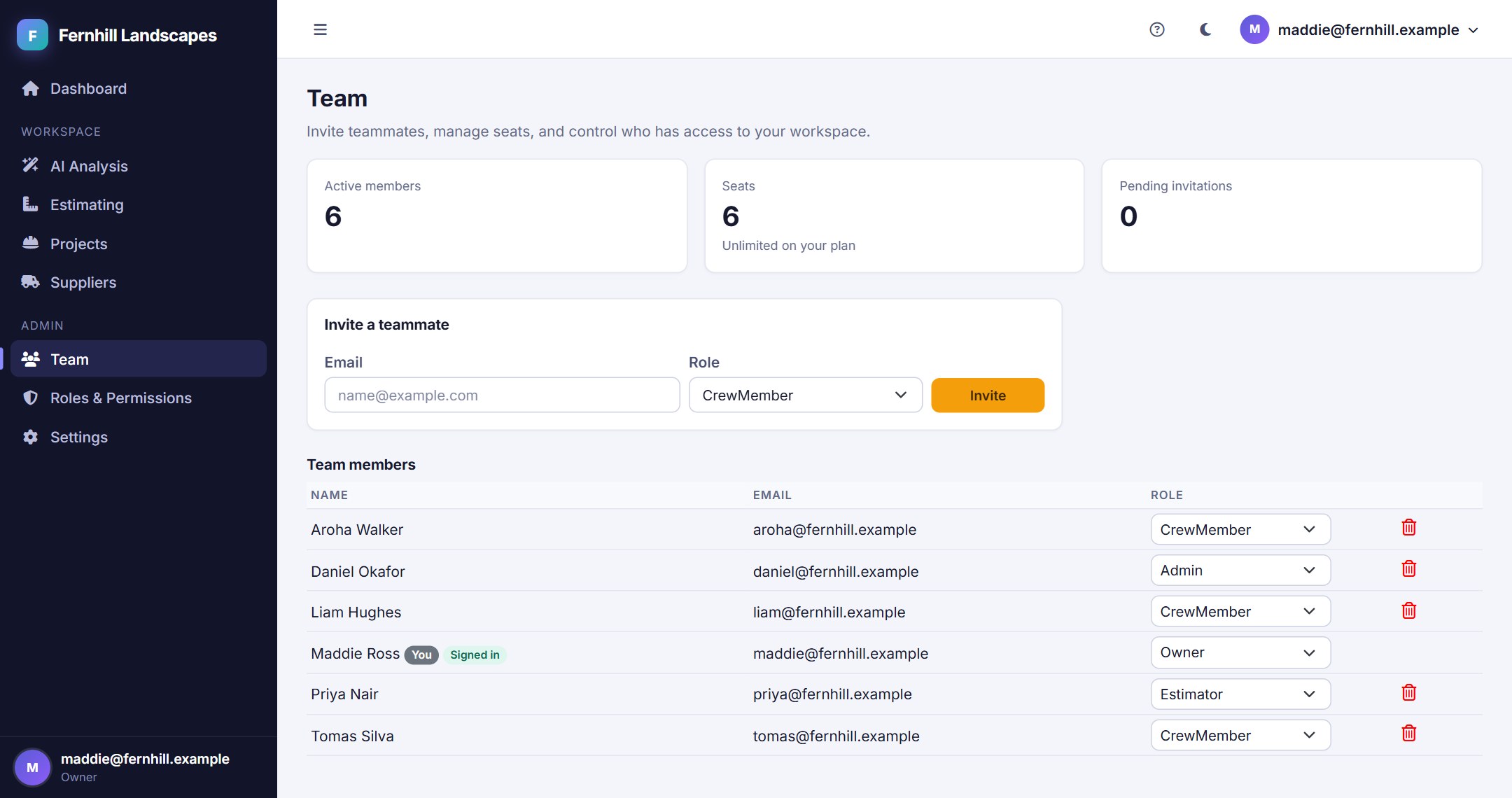
Invite the office and the crew, give each person a role, and keep the work accurate when several of them are in it at once.
- Roles and Permissions - Owners, admins, estimators and crew see and change what suits them
- One Sign-in per Account - A second sign-in with the same login is refused, and an admin can end a stuck session
- No Overwritten Work - If someone else saved first you are told, nothing of theirs is lost, and you see their version
- Help When You Need It - A built-in assistant answers questions from the app's own guide, in light or dark mode
Ready to speed up your quoting?
Let our AI agents handle the grunt work while you focus on design and client relationships.